


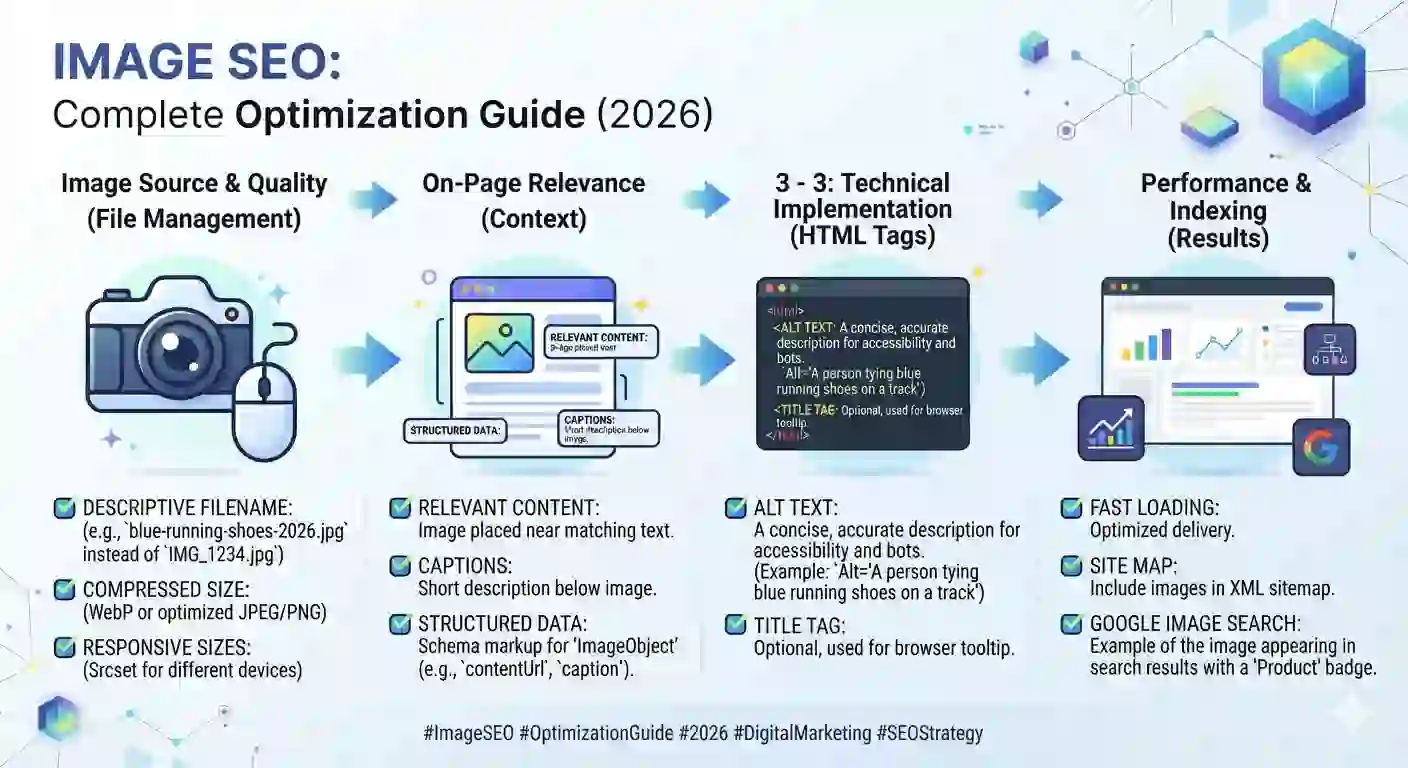
Image SEO: Complete Optimization Guide with Examples (2026)
Every image on your website is either helping you rank — or quietly working against you. Slow-loading photos, missing alt text, and badly named files are some of the most common (and most fixable) reasons pages fail to rank in Google Images, lose Core Web Vitals scores, or get skipped entirely by AI Overviews.
Image SEO isn’t a “nice to have” anymore. In 2026, with Google folding AI Overviews into standard search results and answer engines pulling structured, well-labeled content into their responses, how you optimize your images directly affects whether your content shows up at all. This guide breaks down exactly what image SEO means, why it matters, and how to do it properly — with real examples you can apply today.
What Is Image SEO?
Image SEO is the process of optimizing the images on your website so search engines can understand, index, and rank them — while also making sure those images load fast and don’t hurt your page’s overall performance.
- Descriptive, keyword-relevant file names
- Alt text that accurately describes the image
- Proper compression and file size
- Choosing the right image format (JPEG, PNG, WebP, AVIF)
- Responsive images that adapt to different screen sizes
- Structured data (schema markup) for images
- Image sitemaps
- Accessibility for screen readers
It covers several moving parts working together:
Think of it this way: Googlebot and AI crawlers can’t “see” an image the way a human does. They rely on the text and code around it — file names, alt attributes, captions, and surrounding content — to understand what’s in the picture and whether it’s relevant to a search query. If you skip that step, you’re handing search engines a blank page.
Why Image SEO Is Important in 2026
Image search still drives real traffic, but its role has expanded well beyond Google Images. Here’s why it matters more than ever:
1. Page speed and Core Web Vitals. Unoptimized images are the number one cause of slow-loading pages. Since Largest Contentful Paint (LCP) and Cumulative Layout Shift (CLS) are direct ranking factors, poorly compressed images can quietly tank your rankings even if your content is excellent. If you haven’t audited this yet, our guide on fixing Core Web Vitals — LCP, FID, and CLS walks through the technical fixes step by step.
2. Visual search is growing. Tools like Google Lens let users search using a photo instead of typed keywords. If your product or blog images aren’t optimized with clear file names and alt text, you’re invisible to this entire search behavior.
3. AI Overviews and answer engines need structure. Google’s AI Overviews and other generative engines pull from well-organized, clearly labeled content — including images with proper schema markup and descriptive context. A page with clean image SEO is simply easier for an AI system to understand and cite.
4. Accessibility is now a ranking and legal consideration. Alt text isn’t just for SEO — it’s what screen readers use to describe images to visually impaired users. Getting this right improves usability and keeps you aligned with accessibility standards.
Key Elements, Tools, and Benefits of Image SEO
Alt Text: The Foundation of Image SEO
Alt text (alternative text) is a short HTML attribute that describes what’s in an image. It’s read by screen readers and used by search engines to understand image content.
Bad example: alt="IMG_2093"
Good example: alt="Woman using a laptop to compress an image online before uploading it to a website"
A few rules for writing alt text that actually works:
- Keep it under 125 characters — screen readers often cut off longer text
- Describe the image naturally, the way you’d explain it to someone who can’t see it
- Include your target keyword only if it fits naturally — never force it
- Don’t start with “image of” or “picture of” — screen readers already announce that it’s an image
- Every image needs alt text, including decorative ones (use an empty
alt=""for purely decorative images so screen readers skip them)
File Names That Search Engines Can Actually Read
Before you even touch alt text, your file name is doing work. DSC004821.jpg tells Google nothing. compress-image-online-free-tool.jpg tells Google exactly what the image is about.
Best practices for file naming:
- Use lowercase letters
- Separate words with hyphens, not underscores (
image-compression-tool.jpg, notimage_compression_tool.jpg) - Keep it short and descriptive
- Avoid keyword stuffing — one or two relevant terms is enough
Image Compression and File Size
This is where most websites lose speed. A single uncompressed 5MB hero image can add seconds to your load time.
General file size targets for web use:
- Blog/content images: under 200KB
- Product images: under 300–500KB depending on detail needed
- Hero/banner images: under 1MB, ideally much lower using next-gen formats
- Thumbnails: under 50–100KB
Popular tools for compressing images without losing visible quality include TinyPNG, Squoosh, ShortPixel, and Cloudinary — all of which let you compress an image online for free while controlling the output size in KB or MB.
Choosing the Right Image Format
| Format | Best For | Notes |
|---|---|---|
| WebP | Most web use cases | Smaller file size than JPEG/PNG at similar quality |
| AVIF | Next-gen compression | Even smaller than WebP, growing browser support |
| JPEG | Photos with lots of color detail | Good compression, slight quality loss |
| PNG | Logos, transparent backgrounds | Larger file size, lossless quality |
| SVG | Icons, simple graphics | Scales infinitely without quality loss |
If you’re still serving JPEG and PNG across your entire site in 2026, converting to WebP or AVIF is one of the fastest wins available for page speed.
Responsive Images
Not every visitor needs the same image size. A user on a phone doesn’t need a 2000px-wide banner image loading at full resolution. Using the srcset and sizes attributes lets the browser choose the right image size for each device automatically — cutting load time on mobile significantly.
Image Sitemaps and Structured Data
An image sitemap tells Google specifically which images exist on your site and where, which helps with indexing — especially for image-heavy sites like e-commerce stores or photography portfolios.
Adding ImageObject schema markup gives search engines and AI systems extra context: image license, caption, and creator information, which can improve how your content is understood and potentially surfaced in AI-generated answers.
Image Accessibility
Accessibility and SEO overlap more than most people realize. Screen-reader-friendly alt text, proper contrast in text-over-image designs, and captions for infographics all improve both usability and search visibility at the same time.
Job Scope, Demand, and Where This Fits Into a Broader SEO Strategy
Image SEO isn’t a standalone skill — it’s one piece of a much larger on-page SEO strategy. If you’re optimizing images but ignoring the rest of your page structure, you’re leaving performance on the table.
For a complete picture of what else affects rankings, it’s worth reviewing:
- Our 25-point on-page SEO checklist for 2026 to see exactly where image optimization fits into your overall page setup
- Our keyword research guide to make sure the keywords you’re targeting in file names and alt text are actually worth targeting
- If you’re just getting started, our beginner’s guide to SEO covers the fundamentals that image optimization builds on top of
Demand for technically sound SEO — including image and page speed optimization — has grown steadily as Google has tied more ranking weight to user experience signals. Businesses that ignore this technical layer often see their content quality get overshadowed by poor performance, which is one of the most common reasons sites plateau. If that sounds familiar, our breakdown of why websites don’t rank and how to fix it covers other overlooked technical issues alongside image problems.
Why Choose Flow Stack Hub for Image and Technical SEO
Optimizing individual images is straightforward. Optimizing an entire site’s image library, sitemap structure, and Core Web Vitals performance — while keeping content quality and keyword strategy intact — takes experience.
At Flow Stack Hub, technical SEO isn’t an afterthought bolted onto content writing. Our team audits image compression, file structure, alt text coverage, and page speed as part of a complete on-page SEO process, backed by the same EEAT principles Google uses to evaluate trustworthy websites. You can read more about how we approach EEAT and website authority to understand the framework behind our recommendations.
Whether you’re a small business trying to get found locally or an e-commerce brand with thousands of product images, our SEO services for small businesses are built to fix these technical gaps without slowing down your team.
How to Learn Image SEO (Free and Paid Resources)
Free resources:
- Google’s own Search Central documentation on image publishing guidelines is the most authoritative source and is updated regularly as ranking systems evolve. It’s worth bookmarking directly: Google Search Central – Image SEO best practices
- Web.dev (run by Google) offers free, practical tutorials on image performance and Core Web Vitals
- YouTube channels focused on technical SEO regularly publish walkthroughs on compression tools and responsive image setup
Paid resources:
- Structured SEO courses on platforms like Coursera cover technical SEO fundamentals, including image optimization, as part of broader search marketing certifications
- SEO tool suites like Semrush and Ahrefs include site audit features that flag missing alt text, oversized images, and broken image links — useful for ongoing monitoring. If you’re deciding between platforms, our comparison of Semrush vs Ahrefs vs Ubersuggest breaks down which tool fits which budget and use case
Real-World Example: Image SEO in Action
Imagine a small e-commerce store selling handmade candles. Before optimization, their product photos were named IMG_0234.jpg, weighed 3.2MB each, had no alt text, and used PNG format across the board.
After an image SEO pass:
- File names became descriptive:
lavender-soy-candle-8oz.jpg - Alt text was added: “Lavender soy candle in an 8oz amber glass jar on a wooden table”
- Images were converted to WebP and compressed to under 150KB each
- A responsive
srcsetwas added so mobile users loaded smaller versions automatically - An image sitemap was submitted through Google Search Console
The result: page load time dropped by over 60%, the store started appearing in Google Images for product-specific searches, and their Core Web Vitals scores moved from “Poor” to “Good” — which contributed to a broader ranking improvement across their product pages. This kind of result typically shows up within a few weeks to a couple of months, which lines up with what we cover in how long SEO takes to show results.
Future Opportunities: Where Image SEO Is Heading
Image SEO is becoming more tightly linked to how AI systems understand and cite web content. A few trends worth watching:
- Visual search will keep growing, meaning well-labeled, high-quality images will matter more for discoverability, not less
- AI Overviews and generative engines favor structured content, so pairing images with clear schema markup and surrounding context will likely become a bigger visibility factor
- Multimodal search — where users combine text and image queries — is expanding, rewarding sites that treat images as a genuine content asset rather than decoration
- Page experience signals will continue tying image performance directly to rankings as Google refines its Core Web Vitals thresholds
- Sites that treat image optimization as core technical SEO — not an afterthought — will have a real advantage as search continues shifting toward AI-assisted discovery. It’s worth pairing this work with a look at voice search optimization too, since both trends are part of the same shift toward more conversational, AI-driven search behavior.
Frequently Asked Questions
What is image SEO? Image SEO is the practice of optimizing images — through file names, alt text, compression, format, and structured data — so search engines can index them properly and so they load fast enough to support good page performance.
Why is alt text important for SEO? Alt text helps search engines understand what an image shows since they can’t visually interpret pictures. It also makes your site accessible to visually impaired users relying on screen readers, which supports both usability and rankings.
What is the best image format for SEO in 2026? WebP and AVIF are currently the best choices for most websites because they offer significantly smaller file sizes than JPEG or PNG at comparable visual quality, which directly improves page load speed.
How do I compress an image without losing quality? Use a dedicated compression tool like TinyPNG, Squoosh, or ShortPixel, which reduce file size through smart compression algorithms rather than simply lowering resolution. Aim to keep most web images under 200KB.
Does image SEO affect page speed and Core Web Vitals? Yes. Oversized, uncompressed images are one of the most common causes of poor Largest Contentful Paint (LCP) scores, which directly impacts both user experience and search rankings.
Can AI Overviews use content from optimized images? AI Overviews and generative engines rely on well-structured, clearly labeled content to understand and cite information accurately. Images with proper alt text, captions, and schema markup give these systems the context needed to reference your page confidently.
Conclusion
- If your site’s images are slowing down load times, missing alt text, or invisible to Google Images and AI Overviews, it’s worth a proper technical audit before it costs you more rankings. Explore Flow Stack Hub’s SEO services or book a seat in our advanced technical SEO services to get your entire site — images included — working for you instead of against you.
Image SEO sits at the intersection of technical performance, accessibility, and search visibility — and in 2026, it’s too important to leave unoptimized. Descriptive file names, well-written alt text, proper compression, and the right image formats aren’t optional extras; they’re foundational to how both search engines and AI systems evaluate your pages.