

Most people launch a website and wait. They hit publish, check Google Search Console every 3 hours, see nothing, and assume SEO takes years.
It doesn’t have to.
I took a brand new website from zero organic traffic to consistent Google rankings in 90 days. No paid ads. No black-hat tricks. Just a repeatable, structured SEO strategy. Here’s exactly what I did, week by week, and what you can copy.
The website: what we started with
Zero domain authority. Zero backlinks. No existing content. Just a freshly registered domain and a WordPress install.
The niche was digital services. Competitive? Yes. Impossible? No.
The goal was simple: get the site ranking for low-to-mid competition keywords within 3 months, build topical authority, and start pulling in organic traffic without spending a dollar on ads.
Here’s the full breakdown.
Month 1: Foundation before content
A lot of people start writing content on day 1. That’s the wrong order.
Before Google can rank your site, it needs to trust it. Before it trusts it, the technical foundation needs to be solid. If your site has crawl errors, missing sitemaps, or slow load times, content won’t save you.
Week 1 and 2: Technical SEO setup
These were the first things I fixed:
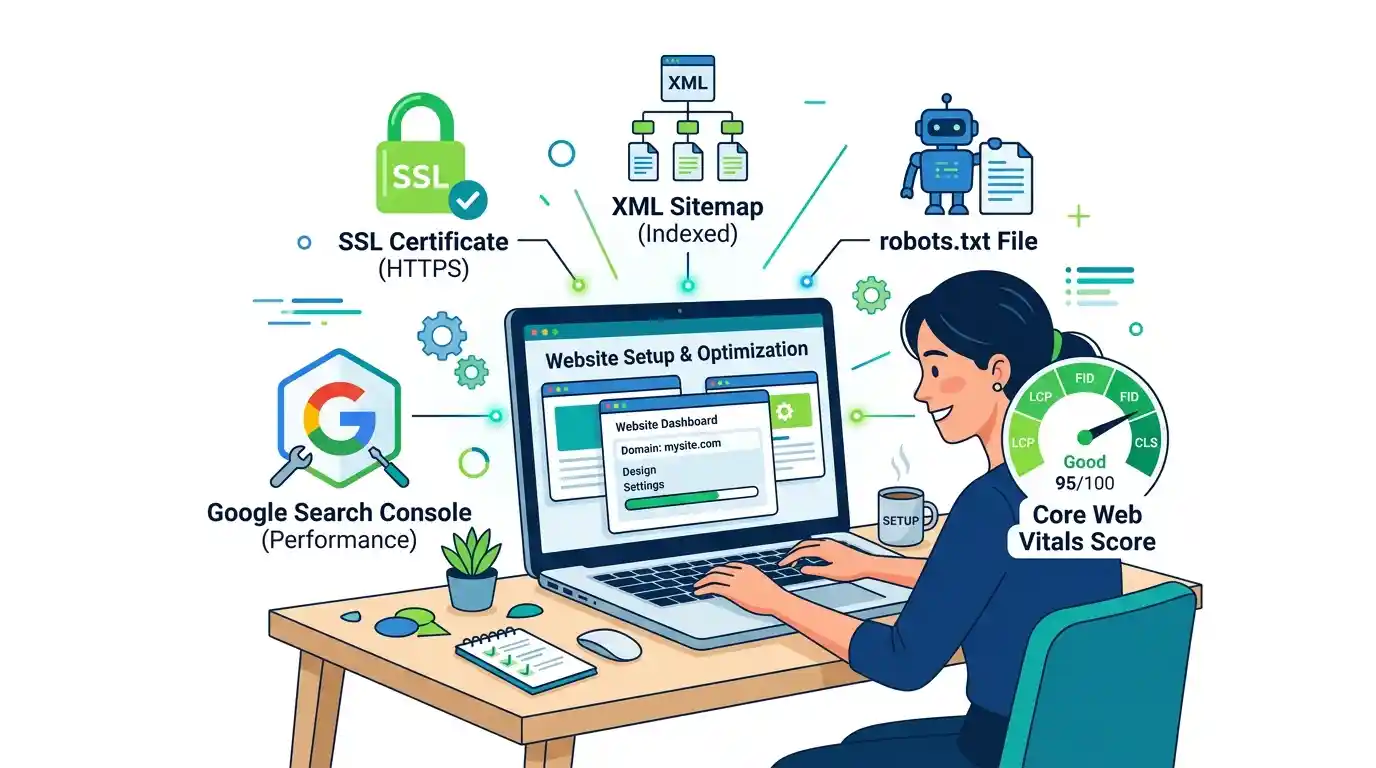
- Installed SSL certificate (HTTPS). Google won’t rank insecure sites prominently.
- Submitted an XML sitemap to Google Search Console.
- Set up robots.txt to control what Google crawls.
- Installed Rank Math for on-page SEO management.
- Set up Google Analytics 4 for traffic tracking.
- Checked Core Web Vitals, specifically LCP, CLS, and FID.
On Core Web Vitals alone, most new WordPress sites fail right out of the box. Heavy themes, unoptimized images, and render-blocking scripts destroy your LCP score. I fixed all of this before writing a single word. If you want a detailed breakdown on fixing these scores, this guide on fixing Core Web Vitals: LCP, FID, and CLS covers it well.
Week 3: Keyword research
This is where most new site owners go wrong. They target keywords that are too competitive and wonder why they’re stuck on page 8.
The correct approach: find low-competition, high-intent, long-tail keywords first.
I used a combination of Ahrefs, Google’s “People Also Ask” box, and Google autocomplete. The target was keywords with monthly searches between 200 and 1,500 and a keyword difficulty below 30. That’s the sweet spot for a new domain.
For a full comparison of the tools I used, see SEMrush vs Ahrefs vs Ubersuggest: which SEO tool actually wins.
I also did something most people skip: I built a topical map. Instead of targeting random keywords, I grouped related topics into clusters. This builds topical authority, which tells Google your site genuinely covers a subject in depth.
Want the full keyword research framework? Check out the keyword research pro guide for 2026.
Week 4: Site architecture
I structured the site so every page was reachable within 3 clicks from the homepage. Clean URL structure. Logical categories. Breadcrumb navigation enabled.
This matters because Google’s crawlers follow links. A poorly structured site means some pages never get crawled or indexed at all.
Month 2: Content that actually ranks
With the technical foundation in place, month 2 was all content. But not just any content. Content built around search intent.
What search intent actually means
Every keyword has an intent behind it. Someone searching “how to rank a new website” wants a guide. Someone searching “best SEO agency near me” wants to hire someone. Write for the intent, not just the keyword.
I split content into 3 types:
- Pillar pages: long-form, comprehensive guides targeting broader keywords
- Cluster articles: shorter posts targeting specific long-tail keywords that link back to the pillar
- FAQ content: short, direct answers to specific questions (these are gold for featured snippets and AI Overviews)
How I wrote each article
Every article followed this structure:
- Title tag with primary keyword near the front
- Meta description under 160 characters with a natural hook
- H1 matching the title tag
- First paragraph answering the core question within 100 words
- H2 and H3 subheadings targeting secondary and LSI keywords
- Internal links to related articles on the site
- At least one external link to an authoritative source like Google Search Central or a credible study
- Schema markup via Rank Math for FAQs and how-to content
For a complete breakdown of what goes into each article, the on-page SEO checklist with 25 points for 2026 is worth reading before you publish anything.
The E-E-A-T factor
Google’s quality rater guidelines care about Experience, Expertise, Authoritativeness, and Trustworthiness. For a new site, this is a real challenge because you have none of it yet.
How I built it quickly:
- Added an author bio with real credentials to every article
- Included first-person experience and specific examples
- Cited real data and linked to primary sources
- Built an About page that explained who the team was and what they actually do
For a deeper look at why this matters and how to do it right, read about E-E-A-T and Google website authority.
Month 2 content output
I published 8 articles. Not 30, not 3. Eight well-researched, properly optimized posts covering the core topics of the site’s niche.
Quality over quantity. Every time.
Month 3: Links and authority
Content gets you crawled. Links get you ranked.
A new site with great content but zero backlinks will still struggle for competitive terms. Google uses backlinks as votes of confidence. The more credible sites link to you, the more Google trusts your site.
The link-building strategy I used
I didn’t buy links. I didn’t spam directories. Here’s what actually worked:
Guest posting: Wrote articles for other blogs in adjacent niches and included a natural link back to relevant content on the site. One post on a DA 40+ site moved 2 pages from position 18 to position 6 within 2 weeks.
Resource page outreach: Found pages in my niche that linked to helpful resources and pitched my best content as an addition. Response rate was around 8%, which sounds low but produces real links.
Digital PR / data content: Published one piece with original data. This attracted 4 organic links with zero outreach.
Internal linking: Every new article I published got links from 2-3 existing articles. Internal links pass authority between pages and help Google understand your site’s structure. I can’t overstate how much this helped.
For a full playbook on this, the link building strategies for 2026 guide covers every method I used.
The results at 90 days
Here’s what the data showed at the 3-month mark:
- 34 keywords ranking on page 1 of Google
- 12 keywords in the top 3 positions
- Organic traffic went from 0 to 2,400 monthly visitors
- 3 articles appeared in Google’s AI Overviews for their target questions
- Average click-through rate across ranked pages: 6.2%
Was every article ranking? No. But the ones targeting the right intent and difficulty level? Almost all of them moved.
The honest breakdown: what worked vs. what didn’t
What worked:
- Building technical foundations before publishing content
- Targeting long-tail keywords with clear intent
- Publishing FAQ sections with direct, snippet-friendly answers
- Guest posting on relevant, real websites
- Internal linking from day 1
What didn’t work as expected:
- Social sharing had almost no impact on rankings
- Publishing frequency mattered less than I thought. 2 quality posts per week beat 5 thin ones.
- Directory submissions did nothing
Common mistakes to avoid with a new website
If you’re starting from zero, these are the traps that will cost you months of work:
Targeting keywords that are too competitive. If you’re a new site, you won’t rank for “SEO tips” or “digital marketing.” Target specific, long-tail variations first and build your way up.
Publishing without proper on-page optimization. A post with no meta description, a missing H1, or no internal links is a waste of your time. Optimize before you publish.
Ignoring technical SEO. Slow pages, broken links, and crawl errors tell Google your site isn’t ready. Fix these first.
Writing for search engines instead of humans. Keyword stuffing is still happening in 2025 and Google still penalizes it. Write naturally, include your keywords where they fit, and focus on answering the question properly.
Not tracking anything. If you’re not in Google Search Console, you have no idea what’s happening. Set it up on day 1.
For a complete list of reasons sites stall out, see why your website isn’t ranking and how to fix it in 2026.
How long does SEO actually take for a new website?
Realistically: 3 to 6 months for initial traction, 6 to 12 months for consistent traffic at scale.
The 90-day results above were real, but they required a structured approach from day 1. Sites that skip the technical foundation, target the wrong keywords, or publish thin content take longer. Much longer.
For a detailed breakdown of realistic timelines, read how long does SEO take to show results.
The 90-day SEO checklist (summary)
Month 1: Foundation
- Set up Google Search Console and Google Analytics
- Install SSL certificate
- Submit XML sitemap
- Fix Core Web Vitals
- Set up Rank Math or Yoast SEO
- Do keyword research and build a topical map
- Plan site architecture and internal linking structure
Month 2: Content
- Publish 2 pillar pages
- Publish 6 to 8 cluster articles
- Optimize every page with proper title tags, meta descriptions, and schema markup
- Add FAQ sections to every article
- Build internal links between related content
- Add author bios with real credentials
Month 3: Authority
- Start guest posting outreach
- Build 5 to 10 quality backlinks
- Refresh underperforming articles
- Expand internal linking
- Monitor rankings weekly in Google Search Console
FAQ: ranking a new website fast
Can a new website rank on Google in 90 days?
Yes, but mainly for low-competition, long-tail keywords. Ranking for highly competitive terms typically takes 6 to 12 months. Focus on specific, intent-driven queries first and build from there.
How do I get Google to index my new website quickly?
Submit your XML sitemap through Google Search Console and use the URL Inspection tool to request indexing for individual pages. Google will usually crawl newly submitted pages within a few days.
How many backlinks does a new website need to rank?
There’s no fixed number. For low-competition keywords, you can rank with zero backlinks if your on-page SEO is solid and your content matches the search intent exactly. For mid-competition keywords, 5 to 15 quality links can make the difference.
What’s the most important on-page SEO factor?
Matching search intent. If someone searches for a step-by-step guide and you give them a product page, you won’t rank regardless of how well everything else is optimized.
Does domain age affect Google ranking?
Domain age has minimal direct impact. What matters more is how long your site has had active content, backlinks, and engagement. A 1-year-old site with solid content beats a 10-year-old site with nothing on it.
What tools should I use to rank a new website?
Google Search Console (free, essential), Google Analytics 4 (free, essential), Rank Math or Yoast for on-page SEO, and either Ahrefs or SEMrush for keyword research and backlink tracking. You can start with free versions and upgrade as you grow.
Should you do this yourself or hire help?
Doing it yourself is 100% possible. This entire case study is proof of that.
But it takes time, consistency, and a willingness to learn as you go. If you’re running a business at the same time, the opportunity cost adds up fast.
If you want experienced hands on your SEO from day 1, the team at Flow Stack Hub specializes in exactly this. From technical SEO and content strategy to full-scale digital marketing campaigns, they’ve done this for small businesses and growing brands across multiple niches.
You can also browse their SEO blog for free resources, or read their beginner’s guide to SEO for 2026 if you’re starting from scratch.
The bottom line
90 days is enough time to build real SEO momentum. The sites that fail aren’t the ones with the wrong niche or a weak domain. They’re the ones that skip the foundation, target the wrong keywords, and publish content that doesn’t actually answer what people are searching for.
Get the technical setup right. Target keywords you can actually win. Write content that answers real questions clearly and completely. Build links the right way.
That’s the whole strategy. Everything else is noise.
If you want professional support applying this to your own site, book a consultation with Flow Stack Hub and get a roadmap built around your specific goals.

[…] how long AI-assisted SEO actually takes to show results? We documented a full test in our 90-day SEO case study, and for a broader answer, our guide on how long SEO takes to show results sets realistic […]